EvilTokens Is Industrializing Device‑Code Phishing: Inside the Storm‑2992 Campaign

Get reasoning, in your inbox.
Threat research and field notes from inside customer inboxes. Twice a month, no spam, unsubscribe anytime.
Keep reading .
More from the StrongestLayer team.
Threat research, customer stories, product updates, field notes from inside real inboxes.
Deep-dive analyses on AI-generated phishing, BEC, QR-code phishing, and adversary-in-the-middle attacks.
Hosted by Alan LeFort & Karen Letain. The cybersecurity shifts that actually matter, every other week.
In early 2026 the crime group Storm‑2992 launched EvilTokens, a phishing‑as‑a‑service (PhaaS) platform that weaponized Microsoft’s device‑code multi‑factor flow. By Sept 2026 it had already hit 12,000+ inboxes in over 10,000 organizations worldwide. EvilTokens used generative AI to craft highly convincing phishing lures and automated the attack chain end‑to‑end. When a victim entered the device code, the attacker’s session was silently authorized, sidestepping passwords and MFA. Stolen tokens were used to establish persistence (often by registering new devices for Primary Refresh Tokens or adding hidden inbox rules).
Working with partners, Microsoft’s DCU disrupted the EvilTokens infrastructure in Sept 2026. However, device‑code phishing remains a potent threat. Defenders must understand this attack flow, how to detect the telltale signs (such as unexpected Microsoft login prompts or new inbox rules), and apply layered defenses. Our TRACE email‑security platform flags signals like “user prompted to enter a code they didn’t request” and anomalous mailbox rules, but the first line of defense is technical controls and user vigilance. Below we detail the Storm‑2992 timeline, the attack mechanics, attacker tooling and market, and a recommended defender playbook.
Campaign Timeline and Scope
EvilTokens/Storm‑2992 first emerged in February 2026. Within months it became one of the largest device‑code phishing services ever seen, thanks to its AI‑driven scale. Microsoft’s threat intelligence tracked the campaign from its early days:
- Feb 2026: EvilTokens PhaaS launches. The group advertises the toolkit on Telegram and begins phishing campaigns. Microsoft notes the service “quickly became one of the most widely used PhaaS platforms,” compromising thousands of accounts.
- Apr 6, 2026: Public analysis of AI‑phishing. Microsoft publishes a blog on an “AI‑enabled device code phishing campaign” that pinpoints EvilTokens as a key driver of large-scale OAuth token theft.
- May–Sept 2026: Global campaigns ramp up. Storm‑2992 partners use EvilTokens to target hundreds of enterprises worldwide, focusing on high-value verticals (finance, wholesale, healthcare, education) in the US, UK, India, etc.. Independent intel would later corroborate “thousands” of impacted accounts in dozens of countries.
- Sept 22, 2026: EvilTokens Disrupted. Microsoft’s Digital Crimes Unit (DCU) coordinates with global partners to seize EvilTokens infrastructure. A public report “Unmasking EvilTokens” is released, detailing the attack chain and response.
After the takedown, related phishing kits (nicknamed “GhostCode” and “N0va” in internal reports) appeared, indicating attackers continue to iterate on device‑code techniques. However, specifics on those variants remain scarce. Overall, the Storm‑2992 effort marks a major inflection point: device‑code MFA is now a mass-attack vector on par with legacy credential theft.
Attack Chain: Device‑Code Phishing Mechanics
Device‑code authentication is meant for headless devices (TVs, conference rooms) that can’t enter usernames/passwords. Normally the device shows a code and the user separately completes login on another browser. The threat here is that the authentication is decoupled from the original session. EvilTokens inserts itself into this flow: the attacker initiates the device code request and entices the user to complete it. In practice this works as follows:
- Reconnaissance: Attackers verify targets. For example, they use Microsoft’s GetCredentialType endpoint (via Graph API) to confirm email existence and possibly MFA status up to two weeks before the phish. This ensures victims are valid and haven’t blocked device‑code MFA.
- AI‑crafted Lure: Using the EvilTokens panel, criminals generate personalized phishing emails. The service offers 44 different themes and AI text generators to match the target’s role. Common lures include fake requests for invoice approvals, RFP submissions, shared documents, or system alerts. In one example, victims received an email inviting them to “submit a proposal for an upcoming project”. The email appears innocuous and relevant to the recipient’s job.
- Device Code Generation: When the victim clicks the link (often an HTML page or PDF redirect hosted on Cloudflare Workers or similar), a hidden script on the EvilTokens page interacts in real time with Microsoft’s identity service. It requests a fresh device‑authentication code and displays it to the user along with a “Copy code” button. The page then redirects the user to the legitimate microsoft.com/devicelogin site. The user sees a prompt like “To sign in, enter the code ANQM6Z7VC on the Microsoft login page”.
- The combination of a realistic-looking email and an official Microsoft login page makes this attack extremely stealthy. EvilTokens further obfuscates the process by redirecting through high-reputation domains (vercel.app, .workers.dev, AWS Lambda) so that no single URL appears malicious. The net effect: most email filters and browsers see normal cloud traffic, and the genuine Microsoft login page in use. By the time the user pastes the code, the attacker session is already fully authorized.
- Session Hijack: Behind the scenes, the EvilTokens script continuously polls Microsoft’s server (using the OAuth
checkStatus()call) while the user interacts with the real login page. When the user pastes the code at microsoft.com/devicelogin and completes any MFA prompt (if not already logged in), Microsoft hands back an access token to the attacker’s session. In other words, the victim’s account is logged into on behalf of the attacker. If the user has an active Microsoft session already, simply submitting the code grants the attacker immediate access, bypassing any further password prompt. - Token Theft: At this point the attacker has a valid OAuth token for the user’s mailbox and other resources. The user usually doesn’t realize anything is amiss: to them it just looked like a normal code verification (often branded with a familiar service name, “Adobe Acrobat Sign – Verify your identity”). Meanwhile, the attacker’s code (and EvilTokens control panel) captures and stores the access token. Because this flow never exposed the user’s password, traditional phishing indicators (like credential fields) are absent.
Post‑Compromise Persistence
Once the attacker has tokens, Storm‑2992 steps up for long-term access and data theft. The attacker can use the token to send internal/external emails (including new phishing messages that appear to come from the victim) and to browse the mailbox. In one observed case, the attackers immediately set up email forwarding and filtering rules via Outlook – quietly exfiltrating communications behind the scenes. They also used EvilTokens’ AI module to sift through the victim’s inbox for high‑value targets (executives, finance staff) and gather further intel via Graph API. For example:
- Persistent Device (PRT): In many campaigns, within minutes of compromise the attacker registered a new device for the account and obtained a Primary Refresh Token (PRT). A PRT allows the attacker’s device to get fresh tokens indefinitely without needing the user’s credentials. This grants a very durable backdoor into the mailbox. Microsoft explicitly warns that stolen PRTs must be disabled and revoked to cut off access.
- Inbox Rules & Forwarding: Alternatively (or additionally), attackers often created malicious inbox rules – auto-forwarding to an external address or moving certain emails to hidden folders. This lets them quietly harvest email or hide further alerts. Microsoft’s guidance is to alert on any suspicious mailbox rule creation as an immediate sign of compromise.
- Data Exfiltration: With tokens and persistence, the attacker could repeatedly search mail contents. In one case they scanned for wire transfer details and invoices tied to financial staff, then likely attempted targeted fraud (wire fraud is a common BEC goal).
By abusing valid authentication flows, Storm‑2992 bypassed legacy MFA while giving the attackers extended access. Unlike typical phishing, EvilTokens allowed attackers to post‑pivot: they could impersonate the victim for further attacks. This “phishing‑as‑a‑service” model even enabled syndication – affiliates could lease the EvilTokens platform for cheap (about $1,500 + $500/month) and launch their own tailored campaigns. The result was an industrialized phishing pipeline: reconnaissance and lure generation became automated, and the adversary could infect thousands of accounts with minimal manual effort.
TRACE and the Device-Code Detection Gap
Detecting device-code phishing is challenging because the final authentication step can happen on a legitimate Microsoft page.
The maliciousness may therefore be concentrated in the intent of the message and the authentication request, rather than in the final destination itself.
That is where TRACE becomes relevant.
The strongest signal is the user's action, not just the URL
In the EvilTokens case, the internal threat brief identifies the intent signal around “enter a code you didn't request” as the key detection opportunity for TRACE. The same brief characterizes TRACE's coverage of the attack as partial, rather than claiming that it controls every stage of the identity compromise.
That distinction is important.
A message can point toward Microsoft's legitimate authentication experience and still be malicious because of why the recipient is being asked to authenticate in the first place.
TRACE's role is therefore strongest on the email and intent side of the attack:
- recognizing an unexpected authentication request
- evaluating the message's intent and surrounding context
- treating an unsolicited device-code instruction as a meaningful risk signal
- correlating suspicious email activity with the broader attack context where supported by the available telemetry
But TRACE is not a magic control that can reverse a legitimate Microsoft authentication after the user has completed it.
Once the user is on the real Microsoft page and authorizes an authentication request that the attacker initiated, identity controls have to take over.
That is why device-code phishing requires layered defense.
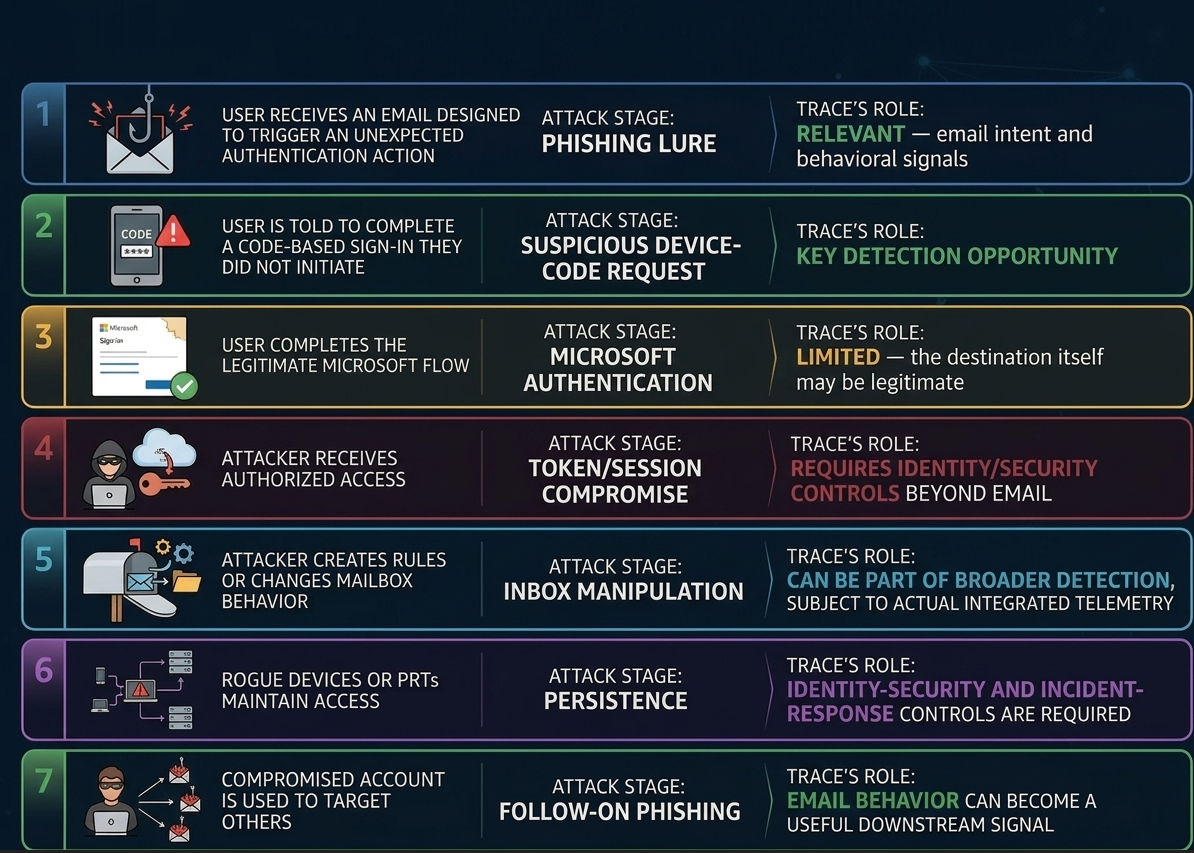
TRACE Capability Mapping Across the Lifecycle
Across the multi-stage device-code attack lifecycle, TRACE functions as both a pre-delivery shield and a post-compromise safety net. Its primary detection leverage occurs at the start of the attack chain, where it analyzes message context to identify invariant intent—specifically flagging emails that attempt to coerce users into unsolicited, out-of-band device-code authentication flows before an attack can execute.
Once a victim reaches the genuine [microsoft.com/devicelogin](https://microsoft.com/devicelogin) portal and completes authentication, TRACE explicitly defers to native identity controls (such as Entra ID Conditional Access and token revocation) to govern the session.
However, should an attacker successfully acquire tokens, TRACE re-engages downstream by analyzing telemetry for post-compromise anomalies, including suspicious mailbox rule creation and internal-to-internal lateral phishing. This gives SOC teams clear visibility at the email and intent layers without overpromising coverage on legitimate identity provider infrastructure.
Mitigation and Playbook
Defending against EvilTokens-style attacks requires both policy and education. Based on vendor guidance, we recommend a layered playbook:
- Restrict Device‑Code Flow: If you don’t have a business need, block the device‑code grant in Conditional Access. For Teams or IoT devices that do require it, scope the exception tightly.
- Train Users: Inform staff that “enter this code” prompts are unusual. Microsoft now shows the app name on legit prompts (“Continuing to sign in to Adobe Acrobat”), but phishing pages often omit this context. Warn employees to cancel if they see a code request out of context.
- Email Filtering: Enable Microsoft Defender Safe Links and Anti-Phishing rules. These can block known malicious domains or flag unusual links. For high-risk users, raise the Advanced Phish Threshold (to 2 or 3) so that any spoofed email (like the internal BEC follow-up) is automatically quarantined.
- Rule Monitoring: Create alerts for suspicious inbox-rule creation. This is crucial: a hidden forwarding rule is a sure sign of compromise. If caught early, you can disable the rule and force a re-authentication before significant data loss.
- Incident Response: If device-code phishing is suspected, immediately follow the compromised-account playbook. Revoke refresh tokens (
revokeSignInSessions), require re-authentication on next login, and temporarily disable the account if possible. (Storm‑2992 actors exploit the hour‑long window of active tokens; disabling the account breaks their PRT access.) - Harden Identity: Enforce phishing‑resistant MFA (FIDO tokens or Authenticator with passkeys) instead of SMS/phone MFA. Implement sign-in risk policies to auto-block or MFA‑challenge high‑risk logins. Block legacy auth protocols that can’t enforce MFA.
- Broader Controls: Use standard anti‑spoof protections (DMARC, SPF, DKIM) and require reverse DDO checks on external emails. Centralize identity logging in a SIEM to spot lateral movement. Consider browser protections (SmartScreen) to block unexpected logins.
Final Thoughts
EvilTokens’ Storm‑2992 campaign proved that device‑code MFA, if unchecked, can be turned against organizations at scale. By mixing personalized lures with automated token capture, attackers industrialized an MFA bypass that evades traditional filters. Defenders must respond in kind: tighten MFA policies, train users to scrutinize unexpected login prompts, and deploy advanced email security that understands context.
In practice, every unsolicited device-code prompt should be treated as a red alert. If a user asks why they saw a code, take it seriously. Use telemetry (Trace or native tools) to correlate that prompt with the originating email. Monitor Azure AD for unknown device registrations or refresh tokens, and enforce breaking of such sessions. Combine this with robust filtering (Safe Links, anti-phish rules) and incident playbooks (token revocation, account disablement) to contain any breach quickly.
Key takeaways: The Storm‑2992/EvilTokens case highlights how AI and PhaaS model have “industrialized” phishing. Even as vendors like Microsoft and Cloudflare shut down infrastructure, variants will appear. Defense is about layering: remove risky MFA paths where possible, augment email filters with AI/behavioral analysis, and stay vigilant for the unique signals of device‑code attacks.
Frequently Asked Questions
Q1: What is device-code phishing?
Device-code phishing is an attack in which an attacker initiates a legitimate device-code authentication flow and persuades a victim to complete it. The victim can unknowingly authorize the attacker's session without directly handing over a password.
Q2: What is EvilTokens?
EvilTokens was a phishing-as-a-service platform associated by Microsoft with Storm-2992. Microsoft said it provided cybercriminals with capabilities including AI-assisted lure personalization and analysis of compromised inboxes.
Q3: How many organizations were affected by EvilTokens?
Microsoft reported more than 12,000 compromised inboxes across more than 10,000 organizations worldwide. SpyCloud separately reported 8,708 victim accounts across 6,585 corporate domains in 79 countries.
Q4: Does device-code phishing steal a user's password?
Not necessarily. The attack abuses an authentication flow so that the victim can unknowingly authorize an attacker's session. Microsoft specifically describes device-code phishing as granting attackers access without exposing the victim's credentials in the usual phishing manner.
Q5: Why is device-code phishing difficult to detect?
Because the final authentication step can happen on a legitimate Microsoft page. A security system looking only for fake login pages or obviously malicious domains may therefore miss the underlying social-engineering intent.
Q6: Can Microsoft block device-code phishing?
Microsoft recommends blocking device-code flow wherever it is not required and applying Conditional Access controls where legitimate use remains necessary.
Q7: What should an organization do after suspected device-code phishing?
Treat it as a potential identity compromise rather than merely deleting the original email. Microsoft recommends following its compromised-account response guidance, revoking refresh tokens, forcing reauthentication and addressing compromised devices or sessions as appropriate.
Q8: Is EvilTokens still active after Microsoft's takedown?
The EvilTokens infrastructure was disrupted, but the underlying device-code technique remained active. The September 25 threat brief reports that sibling kits GhostCode and N0va remained active and that the technique itself was not removed by the takedown.
Q9: Why aren't password resets always enough?
Because attackers may establish persistence through stolen tokens, registered devices or malicious mailbox rules. Microsoft documented cases involving new devices and Primary Refresh Tokens, as well as inbox-rule manipulation.
Subscribe to Our Newsletters!
Be the first to get exclusive offers and the latest news



Catches what your gateway approved.