The Complete Guide to Legitimate Service Abuse: How Attackers Weaponize Trusted Platforms

Get reasoning, in your inbox.
Threat research and field notes from inside customer inboxes. Twice a month, no spam, unsubscribe anytime.
Keep reading .
More from the StrongestLayer team.
Threat research, customer stories, product updates, field notes from inside real inboxes.
Deep-dive analyses on AI-generated phishing, BEC, QR-code phishing, and adversary-in-the-middle attacks.
Hosted by Alan LeFort & Karen Letain. The cybersecurity shifts that actually matter, every other week.
Legitimate Service Abuse (LSA) is an emerging phishing tactic where threat actors use well-known cloud platforms, apps and domains to host malicious content or send harmful links. By hiding behind trusted services (e.g. SharePoint, Google Drive, Dropbox, SendGrid, Calendly), attackers exploit user trust and existing infrastructure to evade detection. Unlike traditional “bad domain” phishing, LSA uses high-reputation domains and real URLs that pass SPF/DKIM checks, making basic email gateways blind to the threat. This trend is driven by the explosive adoption of cloud apps in enterprise environments and the sophistication of attackers who “live off the cloud” to attack at scale.
In this guide, we provide a comprehensive overview of legitimate service abuse: what it is, why it’s growing, and why it works. We examine attackers’ psychology and tactics, outline the typical attack lifecycle, and show which platforms and vectors are most commonly exploited. We explain why conventional email security often fails, and how AI and ML techniques can both worsen and eventually help detect these attacks. We then present key signals and steps for detection and investigation, followed by a layered defense approach (authentication, browser controls, identity protection, vendor governance, user training, and security analytics). We conclude with an implementation checklist, metrics for measuring effectiveness, and future trends (from autonomous phishing bots to deepfakes). FAQs at the end address common questions about this threat. Throughout, we emphasise practical, enterprise-ready guidance that works for global organisations.
What Is Legitimate Service Abuse? (Definition)
At a high level, Legitimate Service Abuse (LSA) refers to attackers hosting their payloads on trusted third-party services and then sending victims links or invites to those sites. For example, an attacker might place a fake invoice PDF on a corporate SharePoint folder or Google Drive, or send a “document share” notification from a legitimate SendGrid email account. To the victim, nothing looks out-of-place: the email comes from a real domain, and the link goes to a genuine cloud URL. The malicious content only appears after the click or sign-in.
In technical terms, LSA is effectively phishing or malware delivery via “allowed” infrastructure. The adversary either hijacks an existing account (e.g. compromises a vendor’s Google Workspace or Office 365 account) or creates a free account on a reputable cloud platform (like GitHub Pages or Cloudflare Workers) to host malicious webpages or files. The email itself is crafted to look like a normal business communication, often mimicking shared-document alerts or calendar invites. Because the sender domain and URL are legitimate, initial filters (SPF/DKIM/DMARC) pass, and URL scanners see only Google/Microsoft/etc. A static detector will often only fetch a “benign” challenge page and never see the hidden payload.
From an enterprise perspective, LSA is essentially a supply-chain phishing vector. Threat actors leverage the trust relationships and cloud tools that businesses rely on. Imagine a finance team member receiving an email from a known supplier with a SharePoint link titled “Invoices for March.” The link looks and feels normal, and scanning it yields no obvious red flags – after all, the URL is on sharepoint.com. Only after the user clicks does the attacker’s true content (an embedded credential harvest or malware drop) appear. This level of subterfuge has earned LSA the nickname “living off the cloud” (a riff on “living off the land”).
Why Legitimate Service Abuse Is Growing (Drivers)
The rise of LSA is a natural consequence of two major trends: widespread cloud adoption and advanced phishing tactics. First, organisations of all sizes have moved heavily to cloud-based email and collaboration tools (Office 365, G Suite, Dropbox, Slack, etc.). Employees send and receive dozens of emails daily that include links to trusted SaaS apps. Attackers simply followed their prey into that environment. As Government Technology observes, “As governments and other players increasingly turn to the cloud, malicious actors are following, adding ‘living off the cloud’ attacks to their repertoires”.
Second, legacy email defenses have become less effective against modern social engineering. Companies increasingly allowlist major cloud domains (e.g. allowing *.sharepoint.com or blocking is not viable), so attackers realized they can “launder” their phishing behind these domains. The Snowflake of email filtering – rules, blocklists, sandbox detonation – was not designed for malicious content on Azure, Gmail, or Dropbox. Industry research confirms this shift: adversaries now prefer infrastructure with high reputation and global reach. According to one threat report, cybercriminals frequently chain together URL shorteners, cloud storage, serverless functions, and email relays – all trusted by design – to outpace static defenses. In short, the same factors that make cloud services attractive for business (ease of use, global CDN, built-in security) also make them attractive to attackers.
Additional growth drivers include:
- Remote Work & BYOD: With employees accessing email from personal devices and home networks, security posture varies. Attackers capitalize on this by using web links that work anywhere and from any device.
- Third-Party Integrations: Companies use thousands of SaaS integrations. Each one can potentially be abused (e.g. OAuth tokens, shared drives), widening the attack surface without additional network alerts.
- Subscription SaaS: Free tiers of services (GitHub Pages, Netlify, Cloudflare Workers) make it cheap for phishers to set up infrastructure.
- Regulatory Context: Many industries require secure collaboration (finance, legal, healthcare). If employees trust that cloud tools satisfy compliance, they may be less skeptical when interacting with those tools – a gap attackers exploit.
Taken together, these trends make LSA a fast-growing problem. For example, a first-quarter 2025 report by the Anti-Phishing Working Group noted that email attackers increasingly embed malicious content in trusted services, a tactic that creates “significant challenges for traditional security controls”. In practice, every day brings new evidence of this shift (e.g. phishing pages on cloudflare.dev subdomains, compromised Dropbox links, fake invoice Google Sheets, etc.). As long as enterprises rely on these platforms, adversaries will keep finding creative ways to misuse them.
The Psychology of Trust
LSA succeeds because users instinctively trust familiar brands and workflows. When an email comes from Google, Microsoft, Adobe, Slack or any widely used platform, people are conditioned to perceive it as “safe.” For instance, a Microsoft 365 alert about a shared file carries the implicit message: “You already know and use Office 365, so it must be ok.” Cybercriminals deliberately exploit this trust. If the domain is sharepoint.com or onedrive.com, most recipients won’t think twice and filters often won’t intervene.
Moreover, messages that mimic normal business processes trigger even less suspicion. An invoice email on a Google Doc or a salary confirmation form from HR on Microsoft OneDrive looks routine — just another part of the daily workflow. Attackers blend in by adopting language and formatting that mirror legitimate communications. They reference real project names, known contacts or even the exact subject lines employees expect (for example, “Re: Q3 Budget Approval”). Research and incident data show that the more an email resembles genuine context, the lower the click rate on warnings or the slower the response. In essence, LSA preys on normal human behavior: we click what looks routine.
Another psychological angle is cognitive overload. In a busy inbox, security cues are often ignored. If a link is on a known domain and the email address display-name looks correct, most people won’t be alarmed. The email has effectively cleared the first gate of trust. For example, the Microsoft analysis of file-hosting abuse notes that recipients “are more likely to trust emails from known vendors,” especially when organizational policies have allowlisted those domains. In short, LSA attacks manipulate assumptions: because the medium is trusted, the intent is often overlooked.
Attack Lifecycle (Flowchart)
Below is a typical Legitimate Service Abuse attack sequence. Each step shows the transition from initial compromise or setup through to exploitation.
Attack Lifecycle Flowchart
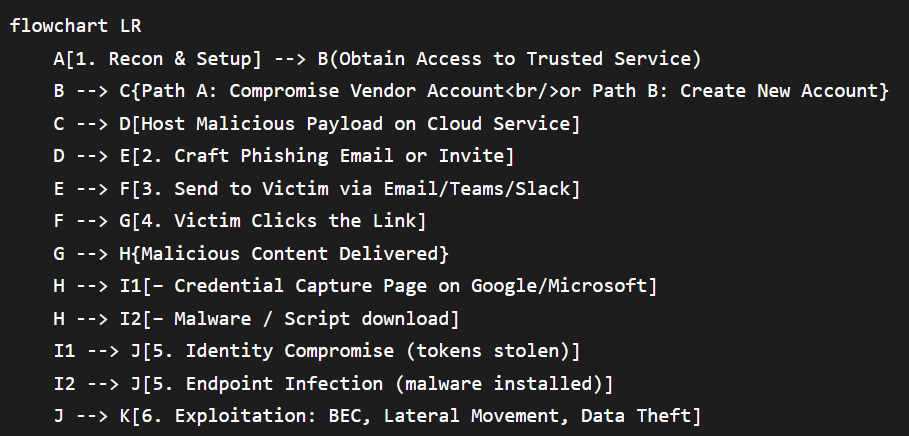
This workflow illustrates how attackers weave legitimate services into each phase. In Stage 1 the adversary either hijacks a compromised account belonging to a trusted vendor or simply creates a new account on a popular cloud platform. Next, they use that service to host their bait (Stage 2). Then (Stage 3) they send a contextually normal-looking email or chat message containing the link. When the target clicks (Stage 4), they are typically met with a login page or payload that appears genuine because it is actually on a legitimate domain (Stage 5). Finally (Stage 6), credentials or malware give the attacker full access, enabling downstream fraud, lateral movement or data exfiltration.
Throughout the lifecycle, every component—from the sender address to the link domain—appears innocuous. The payload is behind the friendly facade. This is why traditional filters (which focus on sender reputation or URL blocklists) fail: they never see anything overtly malicious. Only by understanding the attack chain can defenders insert detection and response at each stage.
Common Platforms and How They’re Abused
Attackers increasingly target specific categories of cloud and SaaS platforms. The table below groups them by function, with examples and common abuse scenarios. In each case, the service’s reputation and trustworthiness are weaponized:
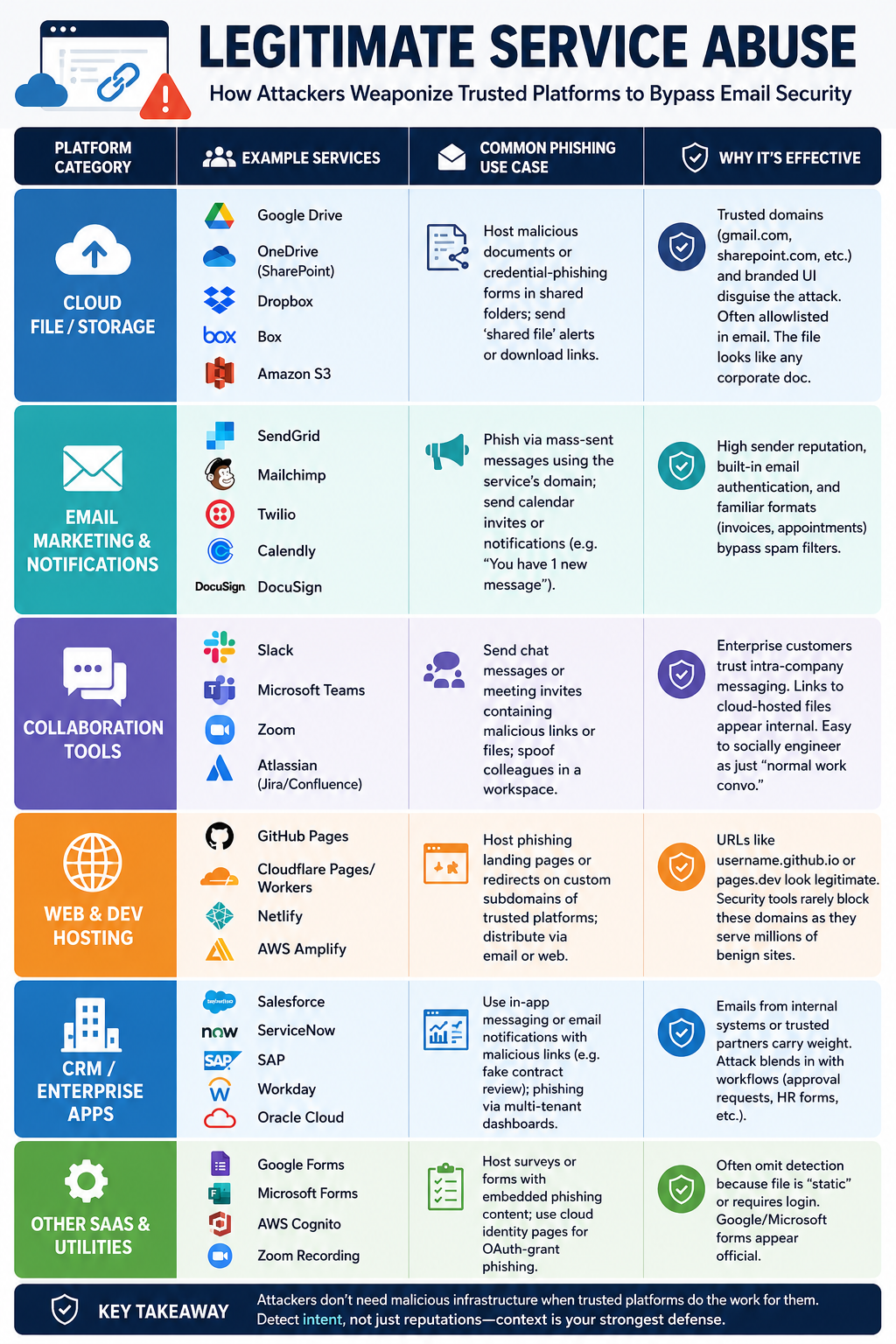
Each category above has legitimate business uses, which is why blocking them outright would cripple operations. Industry research confirms these are the favourite vectors. In fact, a study of modern phishing campaigns found that “URL shorteners, cloud storage, serverless functions, and email relays” are frequently chained together to outsmart static filters. In our own data, roughly 15–20% of sophisticated phishing leveraged trusted cloud platforms (e.g. Google Drive, SharePoint) to host malicious content. The high reputation score of these domains (“laundered” through millions of legitimate emails) means they sail through reputation checks.
Real-World Enterprise Scenarios
To highlight how LSA manifests, consider these typical cases in professional environments:
- Fake Invoice from a Known Vendor: The finance team gets an email from a familiar supplier with a SharePoint or OneDrive link saying “Your April invoice is ready.” The link goes to a real Microsoft domain, but the PDF behind it (or a connected macro) demands payment to a fraudulent account. The use of the supplier’s name and cloud service causes victims to trust the request as routine.
- Pay/Payroll Change Notice: HR or payroll officers receive a notification (e.g. via Google Workspace) that an employee’s bank details have changed, with a link to view a secure form. Clicking prompts a Google login or OTP entry (harvesting login credentials). Because the URL is a Google domain, even a cautious employee might comply, thinking it’s an internal security step.
- Vendor Payment Reminder: An email from “Acme Corp” arrives (spoofed or compromised) with an embedded OneDrive link titled “Invoice_3721.pdf”. Hovering shows the company-my.sharepoint.com domain, so it looks legit. In reality, this SharePoint page is controlled by attackers, who harvest the user’s login or payment.
- Shared Legal Document: Legal teams often exchange contracts via cloud services. An attacker leverages this by sending a “shared Dropbox/Box” link to what appears to be a contract review. The victim opens it, and a phishing form (on dropbox.com) asks for login to “view” the contract. Victims think “company like ours must use Box.”
- Executive or CEO Fraud (BEC): A high-level employee gets a “Urgent request” via Teams/Slack or even email using the company’s domain (e.g. Outlook link) to approve a wire transfer. The links lead to a Microsoft login page under the executive’s OneDrive (mocked), capturing admin credentials. The broad pattern is LSA because the platform is internal/trusted.
- MFA/IT Support Scam: A user receives an email from
accounts@organization.com(actual domain) with a link to reset MFA settings via the company’s Google/Microsoft portal. Since it asks for their corporate credentials on a legitimate login page, they comply. Attackers exploit this to perform account takeover.
In all these examples, the key point is the illusion of normality: the malicious call-to-action is embedded in a process the victim already uses. The email looks like any other internal or vendor communication. Only after our experts investigated (for example in a case at a tech firm) did we find the link was redirecting through cloudflare.workers.dev or google.com/url to a known phishing kit. By then, an employee had entered credentials. These scenarios underline why conventional hygiene (“don’t open attachments”) is insufficient when the attachment lives in a trusted cloud account.
Why Traditional Email Security Fails
Legitimate Service Abuse deliberately bypasses each classic layer of email defense:
- Reputation & Blocklists: Because the sending infrastructure is legitimate (SendGrid, G Suite, Office 365, etc.) and links point to high-reputation domains, any reputation-based filter is effectively neutralized. In practice, the email’s SPF and DKIM checks are passing, and the URL scanner only sees, say, onedrive.com/ which is whitelisted. A technical study found that when an email “arrives through legitimate infrastructure – SendGrid, Google Calendar notifications, SharePoint alerts…” it defeats reputation filtering entirely. Indeed, legacy email gateways will almost never block a well-formed Microsoft or Google link, no matter how malicious the content later.
- Content Scanning & Sandboxing: More advanced gateways detonate attachments and click links in a sandbox. Attackers evade this by hiding payloads behind challenges. For instance, attackers can configure the hosted file as “view-only” or require a one-time-password (OTP) to open it. As Microsoft notes, phishing files are often set to “view-only,” disabling downloads and preventing detection of embedded URLs. In other cases, the link might first hit a CAPTCHA or login page, causing the sandbox to see nothing malicious (and mark it clean). Or the email might contain no link at all (pure-text request), which fools scanners that only look at URLs and attachments. In short, any static or automated analysis can be blinded by gating the true payload.
- Behavioral Analysis: Some systems model normal email patterns to flag anomalies. However, LSA can work around this by compromising an internal account or carefully engineering the flow. If a compromised vendor account sends the email, the traffic appears to come from a known correspondent. Or an attacker could join a mailing list then later abuse it. This contaminates the baseline. Even advanced machine learning models that look for “deviation from normal language” struggle if the attacker writes in the style of an executive or has been active for a while.
- Delayed Updates: Traditional defenses rely on threat intelligence updates. But by the time a blocklist or anti-phishing signature is updated for a new rogue email or domain, the attack is often over. LSA uses “fresh” infrastructure (new storage buckets or pages), so until someone reports that exact link, there is no pre-existing signature to match. Every new link looks novel to the filter.
These gaps are why defenders describe LSA as a structural blind spot. A recent analysis by StrongestLayer found that nearly 35.9% of advanced phishing cases exploit such blind spots, either by using trusted links (like Google redirects or SharePoint) or by shifting the attack entirely off email (phone calls or mobile). In effect, LSA makes email gateways confront a dilemma: blocking any link from Google/Microsoft would cripple legitimate business, so the malicious ones slip by undetected.
The Double-Edged Sword of AI
Artificial intelligence is amplifying the LSA threat – but also opening new avenues for detection. On the attack side, large language models (LLMs) enable crafting of perfectly written, contextually apt phishing lures that human defenders can’t distinguish from genuine business emails. Security research shows that AI-authored phishing emails drastically lower detection rates in common filters. For example, a study comparing AI-generated vs. human phishing found that when LLMs rephrase malicious content, Gmail, SpamAssassin and Proofpoint all saw far fewer catches. Attackers can automatically tailor emails to the target organization, referencing recent events or internal projects, which further reduces suspicion (since the text makes sense).
AI also simplifies scale and diversity of attacks. A single attacker can spin up thousands of unique phishing emails with varied wording, slipping past pattern-based filters. One strong-layer analysis notes that generative AI can paraphrase malicious intents in countless ways, meaning no fixed rule or keyword can catch them. Worse, attackers can automate multi-stage campaigns: generating a malicious Google Form, writing the invite email, and even fine-tuning based on who clicked. In short, AI turns each LSA attack into a custom weapon, rather than a template.
On the defensive side, AI (and broader data science) is also a boon. Because content alone is no longer a reliable indicator of malice, defenders must analyze intent and context – a domain where modern AI excels. Next-generation email security platforms use machine learning to build an “organizational cognitive map” and reason about each message. In practice, this means comparing a suspicious email to billions of data points about the organization’s normal behavior. Does this request match past patterns of this sender? Do the language and timing fit how we expect them to communicate? For example, StrongestLayer’s TRACE engine treats a message like a mini court case: one component (the “Prosecutor”) assembles evidence of malicious intent, another (the “Defender”) builds the case for legitimacy, and a third (the “Judge”) weighs both against the baseline. This kind of intent-based reasoning – powered by AI – can catch LSA even when domain reputation is irrelevant.
Moreover, AI helps churn through massive telemetry. An AI system can automatically correlate email data with endpoint logs and cloud activity, spotting the subtle chains LSA creates. For instance, if multiple employees click different cloud-hosted URLs within minutes, an ML model can group these events as one campaign. Similarly, computer vision can be used to “read” images or embedded files (OCR), retrieving the hidden URLs for analysis. In summary, while generative AI arms attackers with better phishing, it also gives defenders smarter lenses (semantic analysis, anomaly detection, natural language understanding) to spot these otherwise invisible threats. The catch is that these AI defenses must understand enterprise context deeply; mere keyword filtering is no longer sufficient.
Detection Signals and Indicators
Finding LSA requires looking beyond just the email headers. Key indicators include:
- Email Header Anomalies: Check for mismatches in the message envelope. For example, a legitimate-looking Google Drive invite might have a From: address that doesn’t match the Return-Path, or its SPF/DKIM signatures may align with a cloud provider but not the claimed sender. A compliance envelope (ARC) that looks odd or an unusual hop in the Received chain (e.g. an email that routes through a third-party cloud email service) can be a clue. Automated parsing of email headers against baselined user profiles can highlight when a message came through an unexpected channel.
- Redirection and URL Patterns: Always expand and inspect links carefully. LSA often uses multi-stage redirect chains. A URL might start at http://accounts.google.com.somelink.tld, which looks like Google but actually isn’t. Analysts should open links in a safe browser or sandbox to reveal intermediate steps. Look for patterns like long query strings (e.g.
redirect=true&dest=...), unfamiliar domain components, or Google shortener entries (goo.gl,tinyurl.com). Some campaigns use custom subdomains of cloud hosts (for example,xyz.github.io) to hide the final destination. By tracing these chains, defenders can spot when a “friendly” link actually ends up at an attacker-controlled site. In some cases, comparing URL fragments or bucket names against known campaign indicators can connect multiple lures to the same adversary. - Cloud Object Metadata: If possible, examine the shared file or page on the cloud platform itself. Many services let you preview file details. A legitimate share from a known vendor likely has a proper owner and recent modification timestamp. Warning flags include: files with generic or mismatched names (like random letters), recent creation timestamps (especially outside business hours), and restricted sharing settings. For example, attackers often use features like “share with anyone with link” or “view-only” on files. As one analysis noted, malicious files are frequently set to “view-only” mode or require a login/OTP to open, specifically to evade scanners. If you can, consult the cloud service’s access logs or audit trail – unusual access requests or logins from new locations could confirm it’s hostile.
- Behavioral Context: Compare the email to normal user behavior. Does this sender ever send such links, or is this a first time? Is the tone and phrasing consistent with past messages from this person? For example, a manager who usually writes in brief bullet points suddenly sending a full-page narrative PDF is suspicious. Check if the request makes sense: is it normal for the IT department to email payroll changes, or for this vendor to send charts via Google Docs? Use existing baselines of communication patterns (who talks to whom, typical hours) to flag anomalies.
- Authentication and API Signals: Look for unexpected auth events on cloud services. If possible, monitor logs from your SSO/IDaaS provider or CASB. For instance, an OAuth token approval for the company’s data by a new application or user could mean the attacker just gained access to create a malicious shared link. Similarly, a high volume of MFA challenges or sudden password changes on a user’s Google/Microsoft account right after opening a suspicious email strongly suggests compromise.
- Endpoint and Network Telemetry: Email analysis alone may not see the payload. Watch endpoints for signs of impact. This includes process spawning (e.g. PowerShell or Chrome launching from Teams), abnormal DNS queries (e.g. a series of lookups for odd subdomains), or network egress to unknown IPs. If multiple users clicked on similar links and soon after generated identical DNS or SSL certificate requests, correlation engines can group those into an incident. These signals help catch cases where the phishing page may drop a silent credential harvester or a hidden script.
Investigation Playbook (Step-by-Step)
When a suspected LSA attack is detected or reported, follow a systematic approach:
- Quarantine and Triage: Immediately isolate the email. Do not forward or click any links. Flag the message in the mail system to prevent auto-forwarding. Capture all metadata (headers, full email content) for analysis.
- Validate the Sender: Check if the sender’s address is legitimately from your organization or a known partner (including lookalikes or misspellings). Confirm via a secondary channel (e.g. call the vendor or person) if the message was expected. Many LSA scams rely on urgency – a quick verification can derail them.
- Analyze Header/Auth: Use email headers to see if SPF/DKIM/DMARC align with the visible sender. Any failures or alignments that look off should raise alerts. Note if the message was routed through a third-party (Google Cloud SMTP, for instance) that’s unusual for that sender.
- Examine Links and Attachments: For any link, right-click and copy the URL without visiting it. Paste it into a text editor or a safe-browser analyzer. Does the domain match the one advertised? Are there redirection parameters or short links? Tools like URL expanders can reveal intermediate steps. If the URL is a legitimate domain but you suspect abuse (e.g. a company site you usually trust), check the path.
- Check the Destination Safely: If the link points to a cloud file (e.g. Google Drive or SharePoint), log into the cloud service from a secured analysis VM (not your corporate endpoint). Do not use the clicked link; navigate to the service and try to open the file by name. Often, the file or link will require you to sign in or request access – inspect who the owner is. In Microsoft’s incident examples, malicious shared files often needed an OTP or re-authentication. Take note of any unusual file settings (e.g. “anyone can view”).
- Scan the Content: If you can retrieve the file, scan it with updated AV/endpoint tools. Look for macros, hidden fields, or scripts. Even if the file appears blank, use string searches for known phishing keywords (login.microsoft.com, form IDs, etc.). If it’s an HTML page (hosted site), use threat research tools or URL scanners to see if it’s been reported.
- Review Related Activity: Check logs for other indicators. Did anyone else in the company receive a similar email or click the same link? Look at SIEM events: unusual OAuth grants, login attempts, MFA prompts, or network connections following the time of the email. If the victim entered credentials, immediately reset that account’s passwords and revoke active sessions/tokens.
- Contain and Remediate: If credentials or accounts are compromised, follow your incident response plan. Quarantine infected hosts, block malicious domains or paths in proxies/NGFW, and remove the shared file or site if possible. Notify the affected cloud provider of the abuse. Inform relevant teams (legal, HR, finance) to watch for related fraud.
- Learn and Adapt: Document the incident details: how the attacker built the email (templates, infrastructure used, obfuscation tactics). Feed this intelligence back into email filters and threat intel. Update phishing training materials to include this scenario, and share anonymized indicators (e.g. the IP or URL if public info) with your threat intelligence group. This feedback loop is crucial, as each new LSA campaign may hide new tricks.
Layered Defenses: Building Multiple Barriers
No single control stops all LSA attacks. Instead, combine multiple defensive layers:
- Email Authentication: Enforce strict SPF, DKIM, and DMARC policies for your domains. This ensures that real SendGrid or Microsoft-sent emails are properly signed and that unauthorized senders fail. It’s not a panacea, but it at least verifies infrastructure. Also restrict auto-forwarding rules and unmonitored SMTP relays which attackers could abuse.
- Advanced Email Filtering: Use a modern secure email gateway that incorporates AI-driven content analysis and URL threat intelligence. As a minimum, enable sandboxing and turn on features that expand and scan dynamic links. Consider adding an isolation browser for opening links from email on managed browsers. Importantly, work with providers or partners to tune the system for your environment (e.g. adding the common LSA hosting domains as “suspicious” if misused, without blocking them completely).
- Browser/Endpoint Protections: Implement browser isolation or protected browsing tools. For instance, force attachments and links to open in a containerized browser that can be rolled back. Endpoint anti-malware should watch for processes spawned by Outlook/Teams and abnormal network calls. Enforce strong OS and app patches so that even if a link leads to malware, it has fewer exploitation paths.
- Identity & Access Controls: Use conditional access policies. For example, require MFA on all cloud service logins (which already blocks most, since attackers need second factors). If a phishing link redirects to a cloud login, MFA can prevent immediate account compromise. Also monitor for anomalous login behavior (e.g. login from new country or device after clicking a link). Limit third-party app authorizations: apps or scripts that post or host content (like Teams apps or Slack integrations) should be vetted.
- Vendor & Data Controls: Restrict external sharing settings where possible. For example, disable “Anyone with the link” by default, or require reviews for external shares. Employ Data Loss Prevention (DLP) rules that flag unusual external data sharing. If third-party vendors need to email your staff, keep a vetted vendor list and use guest user accounts for collaborations instead of free, unauthenticated shares.
- User Awareness Training: Regularly train users specifically on these scenarios. Emphasise that legitimate-seeming links can still be malicious. Encourage verification of any unusual request even if it appears on a trusted domain. Provide easy reporting channels for suspicious emails (e.g. a Phish Alert button). Phishing drill exercises should include LSA-style templates (e.g. “you have a document in SharePoint” alerts) so users learn to identify them.
- Security Analytics (SIEM/SOAR): Integrate email logs with your SIEM or SOAR to catch patterns. For instance, set alerts when multiple cloud-hosted links are clicked in short succession across different users, or when shared file invitations come from unexpected accounts. Automated playbooks can then trigger containment (quarantine emails, force password resets) based on these indicators.
In practice, a Zero Trust architecture helps. Treat every email link as untrusted until proven otherwise: enforce least privilege on all accounts, and segment critical systems. For example, even if a SharePoint link tricks a user, network segmentation can prevent malware from jumping to on-prem servers. StrongerLayer research stresses that enterprises need to “integrate email signals into their broader Zero Trust architecture” – enforcing strict DMARC, identity protection, and network segmentation to limit damage. Each layer by itself is imperfect, but together they greatly reduce risk.
Implementation Checklist
Use the following checklist as a starting point when hardening your organisation against LSA:
- Inventory Cloud Usage: Know which cloud services and SaaS apps your teams use. Identify any services not centrally managed (e.g. free accounts).
- Harden Email Auth: Ensure SPF/DKIM/DMARC are correctly set up and enforced for all corporate domains. Remove legacy mail flows if possible.
- Configure Email Gateway: Tune the secure email gateway to catch known LSA patterns (e.g. block
bit.ly,short.urlspam, flag unusual redirect chains). Enable sandbox detonation and safe browsing features. - Activate MFA Everywhere: Enforce multi-factor authentication on cloud email, VPNs, VPNs, and especially for any privileged or vendor accounts.
- Lock Down External Sharing: Implement strict sharing policies on file platforms (limit “anyone with link”, require sign-in). Set up DLP rules to watch for outbound shares or files with sensitive data.
- Deploy Browser Isolation: Use managed browser instances or browser isolation proxies for clicking on email links. This prevents potentially malicious scripts from reaching endpoints.
- Train Staff with Examples: Include LSA scenarios in phishing training (e.g. shared Dropbox/OneDrive notifications). Regularly remind staff that “trusted” links can still be harmful.
- Update SIEM/Logs: Ensure your SIEM ingests email and cloud logs. Create custom alerts for unusual cloud app behavior (e.g. new external shares, repeated MFA fails).
- Test Incident Response: Conduct simulated LSA attack drills and walk through the investigation steps. Verify that roles and procedures (e.g. disabling a compromised cloud account) are known.
- Monitor Indicators: Subscribe to threat feeds or research reports (e.g. APWG, Fortra, StrongestLayer) for emerging LSA tactics and YARA/IOCs that you can push to your defenses.
Regularly revisiting this checklist and adjusting it to new threats will keep your posture robust. Remember, because LSA uses legitimate tools, sometimes the best “block” is improved visibility and response speed.
Metrics and KPIs
To measure the effectiveness of your defenses against LSA and related phishing, track metrics such as:
- Phishing Click Rate: Percentage of recipients clicking on simulated LSA-style emails in training exercises. A downward trend shows improved awareness.
- Time to Detect (MTTD): How long it takes from an LSA email’s delivery to when your SOC or user alerts identify it. Shorter is better.
- Incident Volume by Type: Number of confirmed LSA incidents vs. traditional phishing in a period. Shifts can indicate trends.
- Containment Time (MTTR): Time to isolate a LSA incident (e.g. disabling a malicious SharePoint link, resetting accounts). This measures agility.
- Percentage of Blocked vs. Allowed LSA Links: If your gateway has an “allow/deny” list for certain cloud apps, track how many suspicious links are auto-blocked.
- False Positive/Negative Rates: Particularly for any machine-learning filters tuned for LSA, measure how often legitimate communications were flagged versus malicious ones missed.
- User Reporting Rate: Number of LSA or similar emails reported by users relative to the number delivered. A high reporting rate suggests good vigilance.
- Financial Impact: In case of an actual compromise attempt (blocked wire transfers, fraud attempts, or data breach costs), compare the losses averted due to controls versus past incidents.
While exact LSA-specific data may not always be available (since providers rarely share detailed stats), these KPIs give a comprehensive view of your defences’ performance and help justify security investments. For instance, if you see that AI-based email filters catch 90% of known phishing but only 50% of LSA attempts, that gap signals where to focus improvements.
Future Trends to Watch
As the threat landscape evolves, we expect legitimate service abuse to become even more sophisticated:
- AI-Directed Campaigns: Instead of manual phishing write-ups, imagine “agentic AI” bots that automatically research your organisation (e.g. from public annual reports or social media) and generate customized LSA emails and landing pages. This could greatly speed up campaign development and targeting, and might even operate continuously, finding small openings 24/7.
- Deepfake Social Engineering: Voice or video deepfakes might be used in conjunction with LSA. For example, after an email lures a user to a cloud platform, a phone call (with a deepfaked voicemail from “IT support”) could instruct the user to approve a code. The combination of trusted platform link + synthetic voice could be very convincing.
- QR/Phishing Hybrids: Embedding malicious QR codes in legitimate content (e.g. in an image on a SharePoint page) is already rising. This bypasses email scanning altogether. Future LSA might host benign HTML pages that then instruct users to scan QR codes, linking to phishing sites.
- Zero-Trust Subversion: Attackers may increasingly target the very tools meant to enforce trust. For instance, compromising a Zero Trust Policy Control server or identity provider, then using that access to generate malicious links that look even more legitimate (signed with your own corporate certificate, for instance).
- Cross-Channel Escalations: We have seen alerts that LSA attacks often combine channels. In future, a single campaign might start with an email link (on a trusted service) that triggers an SMS-based MFA reset, followed by a collaboration invite on Teams – all orchestrated smoothly. Security teams will need holistic cross-channel monitoring.
- Regulatory and AI Countermeasures: On the defender side, expect more AI-enhanced email scanning services that can parse the content after the click (via integration with email gateway) or generate risk scores based on whole-message intent. Also, data privacy regulations might force providers to expose some metadata of shared files for security monitoring, which could help detection.
Ultimately, attackers will persist in weaponizing the tools organisations rely on. The landscape of LSA is a “moving frontier,” as analysts put it. However, by anticipating these trends and investing in smart, context-aware defenses (and corporate culture of verification), organisations can stay ahead of the curve.
Final Thoughts:
Legitimate Service Abuse is not a niche threat – it is fast becoming one of the most common and challenging phishing vectors for enterprises worldwide. Because it hides in plain sight (using known-good infrastructure), defending against it requires looking beyond surface signals. As we’ve outlined, the keys to resisting LSA are context and layering: understanding each email’s purpose in the organisation, enriching signals with cross-domain telemetry, and combining multiple controls (auth, training, detection, response).
By treating every link with caution and by building AI-driven reasoning into your security stack, you can regain the advantage. Recall that robust incident response and user vigilance are just as critical: often, the human layer catches what machines miss. Even implementing a few of these measures (like strict DMARC plus regular phishing drills) can significantly reduce the risk of a costly compromise.
Remember, these attacks exploit trust. The antidote is smart suspicion: verify any unusual request, even if it looks like a trusted platform. SharePoint links, OneDrive invites and Zoom calls have power – but only if the underlying action makes sense for that scenario. With the right combination of controls and awareness, your organisation can make that sense-check routine and keep its data out of the wrong hands.
Frequently Asked Questions (FAQs)
Q1: What exactly is “legitimate service abuse” in phishing?
Legitimate Service Abuse (LSA) refers to attackers using reputable cloud services or apps (like Google Drive, SharePoint, Dropbox, etc.) as part of their phishing delivery. Instead of sending a link to a shady domain, the email will contain a link to a trusted domain (e.g. docs.google.com or company.sharepoint.com). The attacker hosts malicious content (fake login page, invoice PDF, etc.) on that service. This exploits the trust users have in those services, so traditional email filters often miss it. Essentially, the tactic hides the attack inside familiar infrastructure.
Q2: How is this different from normal phishing?
The difference lies in the delivery channel. In typical phishing, the email link points to a known-bad or compromised website (e.g. malicious-domain[.]com). In LSA, the link is to a legitimate platform that’s allowed in your email policies. The fake content lives on that platform. So your email gateway sees nothing obviously wrong. LSA often requires you to log in with your real credentials to the trusted service, whereas classic phishing usually uses a lookalike domain or attachment. Both are social engineering, but LSA is more stealthy because the infrastructure isn’t inherently malicious.
Q3: Why can’t email gateways block these attacks?
Because the links and email sources look safe by design. Gateways typically check the sending domain’s reputation and scan URLs for known bad signatures. In LSA, both checks pass: the sender might be a legitimate account (like a vendor’s Office 365), and the URL is a well-known domain. For example, an email from trusted@sharepoint.com with a sharepoint.com link has a clean reputation. The malicious part (the credentials or malware) only appears after the user authenticates or goes through a redirect. Gateways don’t see the real payload, so they don’t flag anything. Stopping LSA often requires more advanced detection, like analyzing the intent of the message or correlation with other signals.
Q4: How does multi-factor authentication (MFA) change the game?
MFA makes pure credential theft much harder, but it doesn’t render LSA harmless. In many LSA attacks, if a login page is involved, users may get an MFA prompt. Some attacks use MFA fatigue (bombarding with approval requests) or prompt users to enter an OTP as part of the scam. However, enforcing strong MFA (like hardware keys) still stops many of these attempts. Also, if an attacker can’t get credentials, they might pivot to other goals (like tricking someone into approving a wire transfer via a Teams link). So MFA is crucial, but it must be combined with awareness (never approve an unexpected push) and other controls.
Q5: How can organisations detect when their own services are being abused?
Monitor your cloud logs and email logs closely. For example, watch for unusual share activities on SharePoint or Google Drive (like new files shared externally that don’t fit business patterns). DMARC reports can reveal if someone is improperly sending email on your behalf. SIEM tools can correlate events: for instance, if an employee clicks a link to a cloud service and then logs in from a different location, that’s suspicious. Automated tools that analyze link click behavior can also help – some systems open links in a safe environment and follow the redirects, alerting you if a normally clean link turns malicious after a click. In short, look for anomalies in both email and cloud environment behavior.
Q6: Are certain industries or countries targeted more?
Legitimate Service Abuse is a global issue. Any organisation that uses cloud services can be targeted, whether in finance, healthcare, government, or technology. Attackers do not need a physical presence in the victim’s country – they can send these emails from anywhere in the world. That said, highly regulated sectors (finance, legal, energy) may be especially wary, since they handle very sensitive data. But cases of LSA have been seen worldwide. The best approach is to assume that your industry could be targeted and plan accordingly, rather than rely on geographic luck.
Q7: Can blocking domains like .sharepoint.com stop these attacks?
No. Blocking an entire cloud domain would also block all legitimate business usage of that service, which is usually unacceptable. Instead of blanket blocks, focus on the content of individual emails and links. Use data-aware controls (e.g. reject unexpected external shares or large file transfers). Email filters can be tuned to flag suspicious patterns (like a SharePoint link followed by an immediate password prompt). In practice, you treat each LSA link with caution and combine other signals (as we’ve discussed) rather than trying to block the platform entirely.
Q8: What steps should an organization take first to defend against LSA?
Start with strong foundations: enforce SPF/DKIM/DMARC on all domains, enable MFA everywhere, and train employees about cloud phishing. Then focus on visibility: ensure your email gateway and CASB/EDR solutions are logging and analyzing cloud links, even if they look benign. Integrate email and cloud logs in your SIEM to catch suspicious flows. Implement safe-link browsing or sandboxing for email. Regularly review and tighten external sharing policies on critical cloud apps. Finally, run mock phishing tests that use trusted-platform scenarios to measure user readiness. By taking a layered approach (email control + user training + cloud monitoring), you block many LSA attempts even before they reach a person.
Q9: How does LSA relate to Living-off-the-Land (LOTL) attacks?
They are conceptually similar. “Living off the land” refers to attackers using the victim’s own legitimate tools (like Windows built-in utilities) for malicious ends. Legitimate Service Abuse is essentially LOTL in the cloud space (“living off the cloud”). In both cases, the malware isn’t an exotic payload; it’s the abuse of something that’s already trusted and present. The main difference is that LSA specifically involves third-party services (Google, Microsoft, etc.), whereas LOTL can be local to the machine or network. But the defence strategy is alike: instead of just blocking “bad” tools, you need to monitor how “good” tools are being used in abnormal ways.
Q10: If a cloud service user’s account is compromised, does that count as legitimate service abuse?
It can, yes. If an attacker breaches a legitimate account (e.g. a vendor’s Office 365 account) and then uses that account’s email and files to phish your employees, that is a form of LSA. The difference is subtle: in this case, the service is legitimately owned, but it’s under attacker control. The outcome is the same – the email and link are on a domain you trust (because it is actually coming from a valid account). Defending against this scenario specifically means having tight controls on third-party vendor credentials (detection of unusual third-party logins, reauthentication for external logins, etc.) and verifying shared files regardless of sender authenticity.
Subscribe to Our Newsletters!
Be the first to get exclusive offers and the latest news



Catches what your gateway approved.