The Fake Rolex Problem: What 5,000 Real Phishing Attacks Taught Us About Why Email Security Fails

Get reasoning, in your inbox.
Threat research and field notes from inside customer inboxes. Twice a month, no spam, unsubscribe anytime.
Keep reading .
More from the StrongestLayer team.
Threat research, customer stories, product updates, field notes from inside real inboxes.
Deep-dive analyses on AI-generated phishing, BEC, QR-code phishing, and adversary-in-the-middle attacks.
Hosted by Alan LeFort & Karen Letain. The cybersecurity shifts that actually matter, every other week.
Have you ever held a really good fake Rolex? Not the forty-dollar beach version. The kind that makes a jeweler pause. The movement is Swiss. The crystal is sapphire. The bracelet is 904L steel — the same alloy Rolex actually uses. Every component is genuine, sourced from real suppliers, assembled with real craftsmanship. The only thing that is fake is the crown on the dial and the person selling it to you.
That is the state of phishing in 2026.
The emails hitting enterprise inboxes right now are built from real parts. Real SendGrid accounts. Real Cloudflare CAPTCHAs. Real Google redirects. Real Microsoft domains. Your security tools inspect each component and return a clean verdict, because each component is legitimate. The only counterfeit is the intent.
We built StrongestLayer on one belief: AI would break email security. We expected the weapon to be AI-generated personalisation — hyper-targeted lures no signature system could catch. That is why we built a reasoning engine instead of another rule set.
We were wrong about the weapon. We were right about the problem.
When we analyzed our first 5,000 real enterprise phishing alerts — live enterprise traffic from Microsoft 365 and Google Workspace tenants over a six-month window, every one of them bypassing at least one of the top three secure email gateways — the answers were not about AI personalisation. They were about structural evasion by design.
This post is what we found.
5,000 alerts in the dataset. 100% bypassed at least one enterprise SEG. 100% autonomously investigated with full reasoning. Every alert analyzed end-to-end — not sampled, not triaged. This is what the data actually shows.
What We Expected to Find — and What We Found Instead
The assumption behind most AI-era email security thinking — including our own founding thesis — was that the primary shift would be at the lure layer. Better writing. More convincing pretexts. Deeper personalisation. The attacker as a better copywriter.
The data does not support that framing.
When we examined the 5,000 alerts in our dataset and asked what made each attack succeed in reaching the inbox — in bypassing SPF, DKIM, DMARC, URL reputation filtering, sandbox detonation, content NLP, and human judgment — the answer was almost never the quality of the writing. It was the architecture of the attack chain.
Every alert was autonomously investigated with full semantic reasoning — read the way a human analyst would read it, not dismissed as a false positive. Not sampled. Not triaged. Each one examined completely. What we found when we did that was a consistent structural pattern: attackers are not crafting better emails. They are engineering better kill chains — sequences of techniques, each one chosen to defeat a specific defence layer, assembled into combinations that pass every check the stack can run.
The craft is not in the prose. The craft is in the construction.
The fake Rolex maker does not need to write better. They need to source better components and assemble them in the right order. That is what modern attackers are doing — sourcing legitimate infrastructure and assembling it into a sequence your security tools cannot inspect as a whole, only as individual parts.
22 Techniques. 5 Categories. 1,400+ Combinations.
Across ~3,000 detections from December 2025 through February 2026 in enterprise Microsoft 365 and Google Workspace environments, we mapped every evasion technique present in attacks that reached the inbox. The result: 22 distinct techniques across 5 categories, appearing in over 1,400 documented combinations.
The five categories, with their prevalence in the dataset:
Channel-Shifting Evasion — 35.9% of attacks
This category moves the malicious action off the email plane entirely. The email is not the threat. It is the delivery mechanism for a secondary interaction that the SEG cannot see and has no jurisdiction over. The SEG is structurally irrelevant — there is no URL, no attachment, no executable content to scan.
- Phone Callback / TOAD (Telephone-Oriented Attack Delivery) — 27.9%: The most prevalent technique in this category by a significant margin. The email contains a legitimate-looking notification — a subscription confirmation, a security alert, a delivery notice — with a phone number to call. No link. No attachment. The credential harvest happens entirely over the phone. 99% bypass rate on both M365 and Google Workspace because both platforms have nothing to scan.
- QR Code — 6.0%: The email body contains no URL. The destination is encoded in an image. Automated scanners have no URL surface to analyse. The interaction happens on the user's mobile device. 98% bypass rate on M365/Defender, 96% on Google Workspace.
- Voicemail Pivot — 2.5%: Notification that a voicemail is waiting, requiring the user to call a number or access a link via phone.
- Teams/Zoom Pivot — 0.9%: Directs the interaction to a collaboration platform where security awareness is lower and security tooling is thinner.
- SMS Pivot — 0.4%: Initiates a text message exchange outside the monitored email channel.
URL Evasion — ~65% of attacks
This category controls what the URL resolves to at scan time versus click time, or routes through infrastructure that security tools trust, exceed in recursion depth, or are explicitly configured to allowlist.
- Legitimate Redirect (Legit Redirect) — 43.0%: The URL in the email resolves to a legitimate domain at scan time — Microsoft, Google, DocuSign — and redirects to the malicious destination after the scan completes. Reputation engines never see the final destination because they evaluate the first hop.
- Legit Service Abuse (LOTS — Living Off Trusted Services) — 20.3%: The malicious content is hosted on infrastructure that security policies explicitly allowlist. SharePoint.com and drive.google.com are allowlisted by both M365 and GWS. 91% bypass rate on M365, 88% on GWS.
- Multi-hop Redirect — 19.5%: Routes through three or more hops through trusted cloud providers (AWS, Cloudflare, Azure CDN). Sandbox recursion depth is exceeded before the final destination is reached. Domain rotates between scan time and click time. 87% bypass rate on M365, 82% on GWS.
- CAPTCHA Gate — 19.3%: A genuine CAPTCHA implementation sits between the user and the malicious destination. Automated analysis cannot solve CAPTCHAs. The sandbox terminates without reaching the payload. 94% bypass rate on M365, 89% on GWS.
- URL Shortener — 10.6%: Obscures the final destination through a redirect service. Some platforms resolve shorteners at scan time; many do not because the performance cost is prohibitive at volume.
- Encoded URL — 7.8%: The URL is encoded (base64, percent-encoding, or custom obfuscation) such that it resolves correctly in the browser but does not match blocklist patterns at the string level.
Content Evasion — ~42% of attacks
This category makes the email body and attachments appear benign to keyword filters, NLP classifiers, and content analysis systems. It exploits the gap between what a machine parses and what a human reads — or between what exists as a file and what the browser assembles from components.
- Notification Spoofing — 22.6%: The email mimics a system notification template — DocuSign, Microsoft Security, HR systems, IT helpdesk — using vocabulary and visual formatting identical to legitimate templates. NLP classifiers cannot distinguish it from the genuine notification because the language is identical.
- PDF Attachment — 9.2%: The malicious link is embedded inside a PDF, not in the email body. Many email security platforms do not detonate PDFs at the same scrutiny level as executable files. The URL inside the PDF has no reputation signal at delivery time.
- HTML Smuggling — 4.6%: The malicious payload does not exist as a file anywhere on the network. It is assembled inside the browser from encoded components distributed across the HTML of a legitimate-looking page. The payload never exists as a file on the wire. No hash. No signature. Nothing to sandbox.
- Image-Based Payload — 2.4%: Credentials, instructions, or links are rendered as images rather than text, bypassing keyword filtering and text-based NLP analysis entirely.
Authentication Evasion — ~58% of attacks
This category exploits the gap between what authentication protocols verify — domain ownership — and what humans trust: visual similarity. SPF/DKIM/DMARC cannot distinguish a lookalike domain from a spoofed domain. They only verify that the sending infrastructure is authorised to send on behalf of the sending domain.
- Domain Lookalike — 56.4%: The most prevalent technique in this category. A domain visually similar to a trusted brand — strongestlayer.ai vs strongestIayer.ai, docusign.com vs doc-usign.com, microsoft.com vs micros0ft.com — passes all authentication protocol checks because it is a legitimately registered, legitimately configured domain. SPF passes. DKIM passes. DMARC passes. The domain is not the real domain; it simply looks like it.
- Subdomain Abuse — 2.9%: Uses a legitimate brand name as a subdomain of an attacker-controlled domain: microsoft.com.attacker-domain.net. Many users read domain left-to-right and trust what they recognise first.
- Compromised Account — 1.0%: The email is sent from a legitimately compromised account at a trusted organisation. The sending domain, reputation, and relationship history are all genuine. Only the intent has changed.
- SPF/DKIM Bypass — 0.7%: Technical misconfiguration exploitation allowing authentication to pass without the sender being authorised.
Social Engineering — ~78% of attacks
The most prevalent category by attack presence. This category targets the human, not the technology. It uses vocabulary identical to legitimate business communications, trained on real DocuSign and Microsoft notification language. NLP classifiers cannot distinguish it from genuine communications because the language model has been optimised against the same training data the classifier uses.
- Authority Impersonation — 65.5%: The sender claims to be a figure of authority — the CEO, CFO, IT department, HR, legal — whose requests the recipient is conditioned to act on without extended deliberation. In the dataset, DocuSign + Microsoft lures that target M365 are the dominant combination.
- Financial Lure — 44.1%: Invokes money — a payment, a refund, a missed invoice, a wire transfer — creating urgency around financial action.
- Brand Impersonation — 26.0%: Uses the visual and linguistic identity of a known brand. 7x more brand impersonation targets M365 than Google Workspace in the dataset — DocuSign and Microsoft lures dominate, with every DocuSign impersonation attack targeting M365 tenants.
- Urgency / Scarcity — 17.4%: Manufactured time pressure that reduces deliberation: 'your access will be suspended in 24 hours,' 'sign by end of business today,' 'payment overdue — action required.'
The Most Important Finding: Attacks Are Engineered Combinations
56.8% of attacks in the dataset use four or more evasion techniques simultaneously.
The average attack combines 4.11 techniques. Year-over-year, combination attacks have grown by +130%. And more than 80% of attacks use combinations outside the top 10 most common patterns — meaning the long tail of novel combinations is where most attacks live, not the known, documented chains.
This finding is why signature-based detection is structurally inadequate for this threat class. A detection system built to recognise known-bad patterns will catalogue the top ten chains and miss the other 1,400+. Attackers are not staying inside the documented patterns. They are exploring the combination space.
There is also a critical structural characteristic of combination attacks that makes them more dangerous than the individual technique prevalence suggests: there is zero detection rule overlap between different variant families. The rules that catch a QR code attack and the rules that catch a DocuSign variant attack are completely different. A rule that fires on one fires on nothing in the other. Each combination requires its own detection logic — and no organisation can write 1,400+ rules before the next combination appears.
Three documented kill chains from the dataset
Chain 1: DocuSign + TOAD Hybrid (4 techniques)
This is the most sophisticated chain in the dataset and the one with the highest financial impact. It crosses the email-to-phone boundary, which means no email security tool can complete the analysis chain.
- Brand Impersonation → The email is a pixel-perfect DocuSign notification. Template, formatting, header, footer — identical to genuine DocuSign email. SPF/DKIM pass. Content NLP cannot distinguish it from a real notification.
- Authority Impersonation → The document requiring signature is framed as coming from a senior executive or legal department. The urgency is legitimate: 'signature required or access revoked.'
- Legitimate Redirect → The 'Review Document' link routes through docusign.com before redirecting to the attacker's credential harvesting infrastructure. URL reputation sees docusign.com and clears the message.
- Phone Callback (TOAD) → If the credential harvest does not complete online, a support number is provided. The attacker's operator handles the phone interaction, walking the target through 'account verification' to capture credentials or MFA codes directly.
What each layer misses: SPF/DKIM/DMARC all pass. URL destination is docusign.com (legitimate). Content matches standard template. No payload detected in any attachment. Only a reasoning system that evaluates the entire chain — domain age, sending history, the 3-hop redirect behind docusign.com, the phone number that appears in no legitimate DocuSign communication — produces the correct verdict.
Chain 2: QR + CAPTCHA + Redirect (4 techniques)
This chain was specifically designed to eliminate the URL surface that automated scanners need.
- QR Code → No URL in the email body. The destination is encoded in an image. URL scanners have nothing to process. Safe Links has nothing to rewrite.
- CAPTCHA Gate → The QR code resolves to a CAPTCHA gate before anything meaningful is presented. Sandbox environments cannot solve CAPTCHAs. The analysis terminates.
- Multi-hop Redirect → Behind the CAPTCHA, the user is redirected through legitimate cloud infrastructure (AWS → Cloudflare → final destination). Each hop has a clean reputation. The recursion depth exceeds what most sandboxes follow.
- Notification Spoofing → The final destination mimics a Microsoft MFA re-authentication page. The language mirrors real authentication requests the user sees regularly.
URL never appears in the email body. Automated scanners see nothing to detonate. 98% bypass rate on M365. 96% on Google Workspace.
Chain 3: PDF + HTML Smuggling (4 techniques)
This chain is notable because the malicious payload never exists as a file anywhere on the network.
- PDF Attachment → A clean PDF with no embedded scripts. The PDF contains a URL. Most email security platforms apply lower scrutiny to PDFs than to executable file types. The URL inside has no reputation signal at delivery time.
- HTML Smuggling → The URL in the PDF leads to a page that assembles the malicious payload from encoded components inside the browser. The payload never crosses the network as a file. No hash. No signature. No sandbox detonation target.
- Encoded URL → The assembly instructions are encoded to prevent string-level matching.
- Domain Lookalike → The final destination is a domain visually similar to a trusted brand. Authentication protocols pass.
Malicious payload assembled inside the browser — never exists as a file on the wire.
The combination is the attack. Not the QR code. Not the CAPTCHA. Not the multi-hop redirect. The specific sequence in which these techniques are combined — each one chosen to defeat the layer that the previous technique exposed — is the intelligence that makes modern phishing structurally different from its predecessors.
Six Defence Layers. Modern Attacks Defeat All Six.
Enterprise email security stacks — in both Microsoft 365 and Google Workspace environments — can be mapped to six sequential defence layers. The attacks in our dataset were analysed against each layer. Here is what defeats each one, with prevalence from the data:
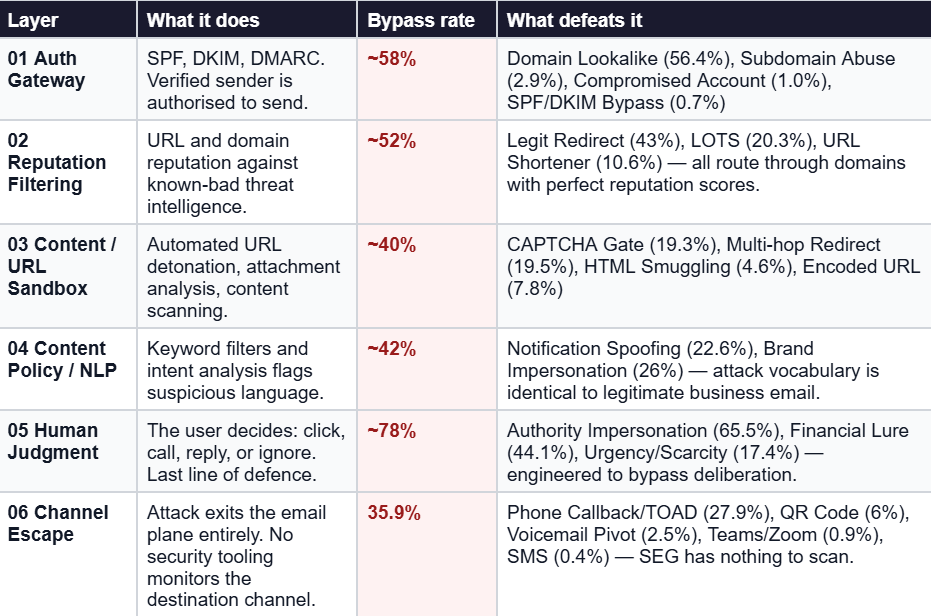
Layer 5 — Human Judgment — has the highest effective bypass rate in the dataset at ~78%. That is not an accident. Social engineering techniques are specifically tuned to defeat deliberation. The language is identical to legitimate communications. The urgency is manufactured at a level calibrated not to trigger suspicion but to suppress the instinct to pause and verify. NLP classifiers cannot distinguish it from genuine communications because it was trained on the same templates.
Layer 6 — Channel Escape — represents the most structurally interesting bypass. When the attack moves off the email plane entirely (TOAD, QR to mobile, Teams pivot), the email security stack becomes completely irrelevant. There is nothing in the email to scan. The threat activates in a channel the SEG cannot see. This is 35.9% of the dataset and growing.
The Dial Is a Trap: Why You Cannot Detect Your Way Out With Rules
Every security team managing email defence faces a configuration paradox that our data makes concrete. Tighten detection — you break the business. Loosen it — attackers win.
This is not a theoretical tension. Here is what the data shows happens at both extremes:
If you block everything suspicious:
- Block DocuSign template lookalikes: 23% of legitimate contract notification emails get quarantined. Legal and finance workflows halt. Business disruption. Rule gets loosened within 48 hours.
- Flag domains registered less than 30 days: New vendor onboarding emails are blocked. Procurement escalates. Exception becomes permanent. Attackers register domains and wait 31 days.
- Block all CAPTCHA-gated URLs: Google reCAPTCHA, SaaS login flows, and partner portals break. Helpdesk is overwhelmed. Rule loosened within hours. CAPTCHA gate remains the #1 sandbox bypass.
If you allow what the business needs:
- DocuSign impersonation passes: Pixel-perfect template. SPF/DKIM pass. Redirects through docusign.com. Credential harvest completes. Zero alerts. Delivered to inbox.
- CAPTCHA-gated phishing delivered: No URL surface behind the CAPTCHA. Scanner cannot detonate. Payload invisible to every rule-based system. ~94% bypass rate on M365. ~89% on GWS.
- Financial lure reaches inbox: Authority impersonation + urgency language scores 'borderline.' Alert auto-dismissed. Human is the last line of defence. ~44% of attacks generate medium alerts. Most are never reviewed.
Attackers calibrate their attacks to stay just below the threshold where blocking them would break your business. The dial is a trap. Every configuration decision you make to protect the business also defines the attack surface attackers will optimise for. Rules are a ceiling on what attackers need to bypass, not a floor on what they cannot.
This is why the data shows +130% year-over-year growth in combination attacks. Attackers are not just discovering that combinations work. They are systematically exploring the combination space to find chains that pass just below the threshold your rules enforce — chains that your configuration decisions have inadvertently defined for them.
Attackers Do Not Spray. They Optimise Per Platform.
One of the most practically significant findings in the dataset: attackers know which email security platform their target uses, and they choose techniques accordingly.
The data shows clear platform-specific technique selection:
- QR Code (no URL in body): 98% bypass rate on M365/Defender, 96% on Google Workspace. Image-only email — no URL surface for either platform to scan. Equally effective on both.
- CAPTCHA Gate: 94% on M365, 89% on GWS. Both sandbox systems are blocked. M365's Safe Links is slightly more aggressive on some CAPTCHA variants, pushing the GWS rate down marginally.
- Legit Service Abuse (LOTS): 91% on M365, 88% on GWS. SharePoint.com and drive.google.com are allowlisted by both platforms explicitly because blocking them would break core productivity workflows.
- Multi-hop Redirect (3+ hops): 87% on M365, 82% on GWS. Recursion depth exceeded. Domain rotates between scan and click time.
- Phone Callback (TOAD): 99% on M365, 99% on GWS. No URL or attachment on either platform. Both have nothing to scan.
The platform targeting split is stark:
- 7x more brand impersonation targets M365 than Google Workspace. DocuSign + Microsoft lures dominate. In the dataset, every DocuSign impersonation attack targeted M365 tenants — zero targeted Google Workspace.
- 3x higher payload delivery rate in Google Workspace for calendar invite and TOAD attacks. Defender E3's stricter URL scanning pushes attackers toward redirect-heavy GWS techniques. Calendar invite phishing concentrates in GWS because the calendar event persists even after the email is deleted — a characteristic Defender's remediation only partially addresses.
This platform specificity is important for security teams to understand. It means that threat intelligence from a competitor's Microsoft 365 breach is not directly applicable to your Google Workspace environment and vice versa. The attack chains are different by design.
What Actually Catches This: The Full Reasoning Chain
Let me show you how our reasoning engine reads one of these attacks, using a representative case from the dataset.
The attack: DocuSign impersonation → Legitimate redirect → CAPTCHA gate → Credential harvest → Authority + Financial lure → M365 tenant
What rules and ML see:
- SPF/DKIM/DMARC: All pass
- URL destination: docusign.com (legitimate)
- Content keywords: Standard DocuSign template
- Attachment scan: No payload detected
- Domain age: 7 days — flagged, but not blocked at this threshold
- ML peer comparison: No similar messages in 30 days — suspicious flag
Rules verdict: CLEAN. ML verdict: SUSPICIOUS (ignored — medium confidence, not above quarantine threshold).
What reasoning sees:
- 1. Sender Analysis: Domain is 7 days old. No prior sending history with this recipient. Claims to be CFO. First-contact message requesting financial action. The combination of new domain + claimed executive identity + financial request is anomalous.
- 2. Intent Mapping: Urgency language — 'signature required or access revoked.' Financial lure combined with authority impersonation. The email is engineering urgency around a financial action through an authority claim.
- 3. Chain Analysis: URL routes through docusign.com → 3 hops → CAPTCHA gate → unknown destination. Legitimate DocuSign emails do not route through 3-hop redirect chains behind CAPTCHA gates. The routing structure has no legitimate business explanation.
- 4. Context Check: No peers in the organisation received similar DocuSign requests in 30 days. This sender has no relationship with this recipient. There is no legitimate business context for this request at this time.
- 5. Verdict: High-confidence phishing. Authority impersonation + financial lure + redirect evasion. Blocked. Full reasoning chain attached to the alert for analyst review.
Reasoning verdict: MALICIOUS (blocked). Resolution time: under 2 minutes. Full explanation attached. No analyst investigation required.
The fake Rolex is not exposed by a better loupe examining each component. It is exposed by a craftsman who asks: why would a genuine manufacturer route through an unknown workshop before final assembly? That question — why is this chain constructed this way — is what reasoning asks. And it is the only question that exposes a fake built from real parts.
What This Means for Your Security Architecture
Three conclusions from the data that should change how you think about email security architecture in 2026:
1. Single-technique rules are a losing game against combination attacks
With 80%+ of attacks using combinations outside the top 10 most common patterns, and zero detection rule overlap between variant families, no organisation can rule-engineer their way to comprehensive coverage. The combination space is too large and growing at +130% year-over-year. The right architecture evaluates the combination's intent, not the presence of individual indicators.
2. Your configuration decisions are your attacker's roadmap
Every rule you loosen to protect the business defines an attack surface. Attackers in our dataset demonstrate systematic optimisation against the specific thresholds of the specific platforms they are targeting. The only way to break this cycle is to move detection to the intent layer — where the attacker's optimisation goal (stay below the threshold) does not apply, because the question is not 'how suspicious is this indicator?' but 'what is this email trying to accomplish?'
3. Channel escape is the fastest-growing gap
35.9% of attacks in the dataset exit the email plane entirely — through phone callbacks, QR codes to mobile, Teams pivots. No email security architecture currently monitors what happens after a user dials a number or scans a QR code on their personal phone. This is not an edge case. It is more than a third of the dataset. Security teams need to build awareness programmes specifically around TOAD and QR interaction, because no technical control can see what happens in that channel.
Final Thoughts
We built StrongestLayer expecting AI personalisation to be the weapon. What 5,000 real alerts taught us is that the weapon is structural — it is the combination, the chain, the sequence of techniques assembled to defeat each defence layer in order.
The fake Rolex is not convincing because the writing on the dial is good. It is convincing because every component is genuine, and the only counterfeit is the intent behind the assembly.
Detecting it requires the right question: not 'is each part legitimate?' but 'why would any legitimate manufacturer assemble these legitimate parts in this specific sequence?' That is intent reasoning. That is what our data shows works. And it is the architectural distinction that defines what email security needs to be in 2026 — not a better rule set, not a better anomaly detector, but a system that reasons about purpose.
Frequently Asked Questions (FAQs)
Q1: What is the dataset behind this research?
The data represents approximately 5,000 phishing alerts from live enterprise traffic — Microsoft 365 and Google Workspace tenants — collected over a six-month window ending February 2026. Every alert bypassed at least one of the top three secure email gateways. Every alert was autonomously investigated end-to-end with full semantic reasoning — not sampled, not triaged, not dismissed as a false positive without investigation. The detections used for technique mapping represent approximately 3,000 confirmed phishing attempts from December 2025 through February 2026.
Q2: What is TOAD and why does it have a 99% bypass rate?
TOAD stands for Telephone-Oriented Attack Delivery. The attack delivers a phishing email with a phone number rather than a link. The email contains a legitimate-looking notification — a subscription confirmation, a security alert, a package delivery notice — and instructs the user to call a number if they did not initiate the action. The attacker's operator handles the call, walking the target through 'account verification' to capture credentials, MFA codes, or financial information directly. The 99% bypass rate on both M365 and Google Workspace reflects a structural limitation: email security tools inspect email content. TOAD attacks contain no URL, no attachment, no executable content. There is nothing for the security stack to scan. The threat activates entirely in a channel — the phone — that no email security platform monitors.
Q3: What is HTML Smuggling and why is it hard to detect?
HTML Smuggling is an evasion technique where the malicious payload is not delivered as a file through the network. Instead, a user is directed to a web page that assembles the malicious payload entirely within the browser using encoded components distributed across the page's HTML. The payload never exists as a file on the wire — it is constructed locally, inside the browser, after the page loads. This means there is no file to hash, no file to sandbox, no network transfer to intercept. The payload is assembled from components that appear individually as normal HTML elements. The only way to detect HTML Smuggling is to evaluate the assembled intent of those components — what they produce when combined — rather than inspecting them individually.
Q4: Why do attackers target Microsoft 365 and Google Workspace differently?
The data shows that attackers select evasion techniques based on the specific detection capabilities and allowlist configurations of the target platform. Microsoft 365 with Defender has stricter URL scanning and more aggressive Safe Links behaviour for certain URL patterns, which pushes attackers toward channel-shifting techniques (QR codes, TOAD) and redirect chains that route through allowlisted Microsoft infrastructure. Google Workspace has different sandbox behaviour and different allowlist configurations, making calendar invite phishing and redirect-heavy chains more effective. The 7x concentration of DocuSign brand impersonation on M365 reflects that DocuSign is a primary Microsoft 365 workflow integration — attackers go where the trust is established.
Q5: What does 'intent reasoning' mean in practice for email security?
Intent reasoning means the detection question is 'what is this email trying to make the recipient do, and is that purpose consistent with any legitimate business communication?' rather than 'does this email match a known-bad pattern?' In practice this means: a system reads the sender analysis, the chain of redirect hops behind the URL, the social engineering framing in the message body, the relationship history between sender and recipient, and the specific combination of techniques present — and asks whether that combination serves any legitimate purpose.
A DocuSign notification that routes through 3 redirect hops behind a CAPTCHA gate to an unknown destination has no legitimate purpose. That assessment does not require matching a known pattern. It requires reasoning about whether the construction makes sense for what the email claims to be.
Subscribe to Our Newsletters!
Be the first to get exclusive offers and the latest news



Catches what your gateway approved.